Book › Interface › Panels › Memory Maps
Memory Maps panel key m
The named point clouds your connecting brushes reach toward.
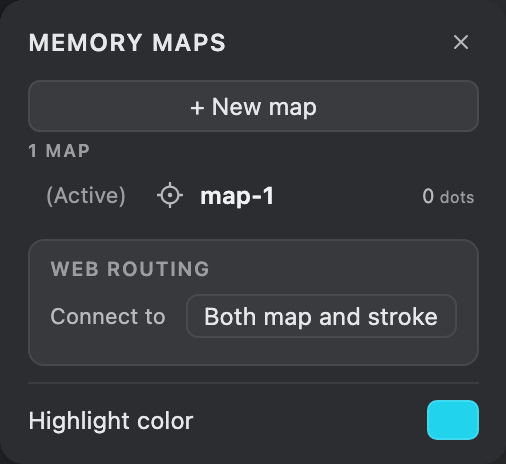
What it is
A memory map is a set of remembered points - separate from the painted pixels and shared across layers. Connecting brushes weave their web toward these points, so a map lets a drawing "remember" what to link to. Open the panel from the navbar maps pill (its ⌄ menu, then Memory map settings), the Windows menu, or m. For how maps feed the web, see Memory maps.
The flash icon on the navbar maps pill is a hot map toggle: click it to keep the active map's dots visible on the canvas while you draw (they flash once as they turn on, so you can spot them, and a chip shows the live point count), and click again to turn them off. It stays lit while the hot map is on.
Controls
- Active map
- The map new points are deposited into. Click a row to switch; its live point count shows here (and in the maps pill's ⌄ menu).
- Flash
- Each row's target button briefly lights up that map's dots on the canvas - a pulse that fades - so you can see where they are. (The navbar maps pill's flash icon instead holds the active map's dots on; see above.)
- Highlight color
- The swatch at the bottom sets the colour of the highlight dots, used by both the per-map flash and the navbar hot map. Click it to choose from the palette.
- Add / Rename / Delete
- Make a new map, double-click to rename, or remove one.
Web routing
The group below the map list controls how a connecting brush connects. It shows only for brushes that weave a web; the web reads from and trails into the active map automatically.
- Connect to
- Connect to old points, this stroke, both, or nothing - see Memory maps for the full breakdown.