Book › Interface › Panels › Symmetry
Symmetry panel key y
Pick a symmetry mode and shape how your strokes repeat.
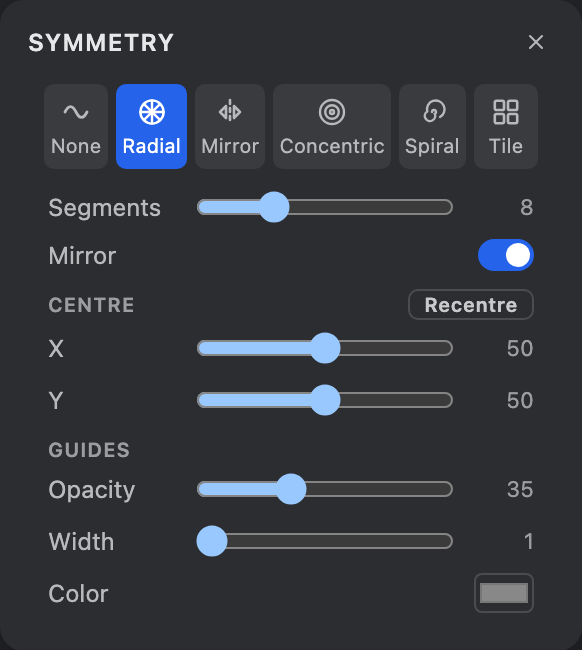
What it is
A mode picker - None, Tile, Radial, Mirror, Concentric, Spiral - plus the parameters for the chosen mode and the on-canvas guide lines. Whatever brush is active gets repeated. Open it from the navbar Symmetry pill, the Windows menu, or y. For what each mode does, see Symmetry.
Tile parameters
- X / Y spacing
- The lattice pitch - distance between tile junctions.
- Fill canvas
- Tile the whole canvas at full strength (Reach and Falloff grey out). Best with a small motif.
- Reach
- How far the tiling spreads out from where you started.
- Falloff
- How sharply copies fade toward the reach edge (0 = even).
Radial & Mirror
- Segments (Radial)
- How many wedges the kaleidoscope splits into.
- Mirror (Radial)
- Reflect each wedge as well as rotating it.
- Vertical / Horizontal (Mirror)
- Quick presets for the mirror line through the centre.
- Angle (Mirror)
- Tilt the mirror line to any angle (90 = vertical, 0 = horizontal) for a diagonal.
Concentric parameters
- Rings
- How many scaled copies radiate from the centre (including the original).
- Scale %
- Size of each ring vs the previous (under 100 shrinks inward, over 100 grows outward).
- Twist
- Rotate each ring for a spiral mandala (0 = pure concentric rings).
Spiral parameters
- Copies
- How many copies march around the spiral, per arm.
- Arms
- Repeat the whole spiral this many times around the centre.
- Angle step
- Degrees of rotation between successive copies.
- Scale %
- Size of each copy vs the previous (100 = a flat rotational fan).
Centre
- X / Y
- Move the pivot for Radial, Mirror, Concentric and Spiral anywhere on the canvas (a percent of its width / height). A crosshair marks it.
- Recentre
- Snap the centre back to the middle of the canvas.
Guides
- Opacity / Width / Color
- Style the on-canvas guide lines (the lattice, spokes, mirror line, rings or spiral arms) that show where copies fall. Guides sit above the drawing but below the panels.